
Here are the category-specific pricing "dead zones" on Amazon.
𝗪𝗵𝗮𝘁'𝘀 𝗮 𝗱𝗲𝗮𝗱 𝘇𝗼𝗻𝗲?
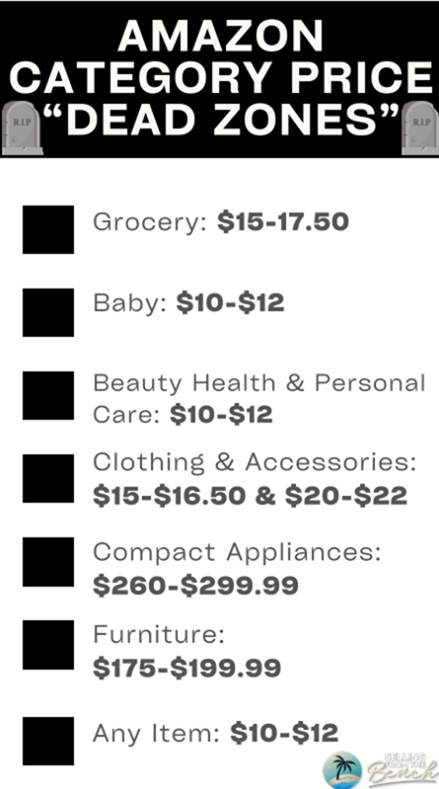 A dead zone is an area where you should never price your product.
Why?
Amazon gives referral fee breaks at different prices.
If you price even one cent above the break, your referral fee doubles(in many cases).
For example:
If you price your box of cookies at $15 instead of $14.99, your referral fee jumps from 8% to 15%.
...But it isn't just $15 where you make less, it's $15.01, $15.02, $15.03, etc.
Eventually, pricing higher actually leads to more profit.
But until that occurs, you're in the dead zone.
You're charging more and making way less.
A dead zone is an area where you should never price your product.
Why?
Amazon gives referral fee breaks at different prices.
If you price even one cent above the break, your referral fee doubles(in many cases).
For example:
If you price your box of cookies at $15 instead of $14.99, your referral fee jumps from 8% to 15%.
...But it isn't just $15 where you make less, it's $15.01, $15.02, $15.03, etc.
Eventually, pricing higher actually leads to more profit.
But until that occurs, you're in the dead zone.
You're charging more and making way less.
Review your catalogs.
Are any of your prices in this range? If so, you're making a lot less than you could. Saving money is what we do here.Category-Specific Dead Zones You Need to Know
Pricing dead zones are not just about the number. They are about understanding that Amazon's fee structure creates invisible walls in your pricing strategy.
The most dangerous dead zones by category:
- Grocery: $15.00. Referral fee jumps from 8% to 15%. Stay at $14.99 or go to $17+.
- Health & Household: $10.00. Same jump from 8% to 15%. Price at $9.99 or $12+.
- Beauty: $10.00. Identical structure to Health. The $10.01-$11.99 range is a margin killer.
- Baby Products: $10.00. 8% below, 15% at and above.
Build these thresholds into your product research. Before you even source a product, calculate your margins at the threshold price points. If your target price falls within 10% of a threshold, decide which side you want to be on and design your product economics accordingly. It is much easier to plan for this upfront than to discover it after you have 2,000 units in an FBA warehouse.
Frequently Asked Questions
What are Amazon pricing dead zones and how do they affect sellers?
Pricing dead zones are price points where Amazon's referral fee percentage jumps significantly, often from 8% to 15%. Pricing at or just above these thresholds means you pay nearly double the referral fee without enough extra revenue to compensate.
How do I find the referral fee thresholds for my Amazon category?
Go to Seller Central, then Help, then Fee Schedule and look up your specific category. Pay attention to tiered referral fee structures where the percentage changes at certain price points. You can also use the Amazon Revenue Calculator to compare fees at different price points.
Should I always price below Amazon referral fee thresholds?
Not always. If your product has enough margin to absorb the higher fee, pricing above the threshold is fine. Just avoid pricing right at it. The sweet spot is either 1-5% below the threshold or 15%+ above it.