
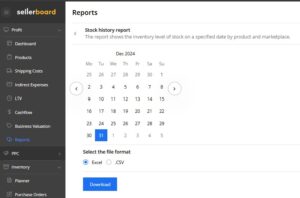
Step-by-Step: Pulling Your Ending Inventory Report from Sellerboard
Getting accurate ending inventory values is critical for your tax filing. Here is the exact process in Sellerboard:
- Step 1: Log into Sellerboard and navigate to Profit, then Reports, then Stock Valuation.
- Step 2: Set the date to your fiscal year end (December 31 for most sellers).
- Step 3: Choose your cost method. Most Amazon sellers use FIFO (First In, First Out) or weighted average cost. Check with your accountant.
- Step 4: Export the report as a CSV. This gives you per-ASIN inventory quantities and values.
- Step 5: Reconcile with Amazon's inventory report. Pull the Manage FBA Inventory report from Seller Central and compare unit counts.
Important: your ending inventory value directly affects your taxable income. Higher ending inventory means higher taxable income because those goods have not been deducted as cost of goods sold yet. Make sure the number is accurate.
Frequently Asked Questions
Why do I need to calculate ending inventory for my Amazon FBA business?
Ending inventory is required for tax filing because it determines your Cost of Goods Sold (COGS), which directly affects your taxable income. The formula is: COGS = Beginning Inventory + Purchases - Ending Inventory.
What inventory valuation method should Amazon FBA sellers use?
Most Amazon FBA sellers use FIFO (First In, First Out) or weighted average cost. FIFO is the most common and is accepted by the IRS and CRA. Consult your accountant and be consistent year over year.
How do I reconcile my Sellerboard inventory with Amazon reports?
Pull Sellerboard Stock Valuation report and Amazon Manage FBA Inventory report for the same date. Compare unit counts per ASIN. Common discrepancies come from units in transit, customer returns being processed, reserved inventory, and unfulfillable units.