
 If you haven't read Andrew Bell and Oana Padurariu's RUFUS Blueprint (8,000 words) it's time to start.
Everyone knows the future is AI.
On Amazon, that AI is Rufus. And Rufus relies on semantically rich alt text to process and rank images effectively.
If you haven't read Andrew Bell and Oana Padurariu's RUFUS Blueprint (8,000 words) it's time to start.
Everyone knows the future is AI.
On Amazon, that AI is Rufus. And Rufus relies on semantically rich alt text to process and rank images effectively.
How?
Well... We want Rufus to understand our products and recommend them. One of the ways we can do this is by having semantically relevant alt text. Rufus uses tools like Visual Label Tagging to align images with customer search intent. Adding descriptive alt text ensures your products show up in searches and get recommended in responses. This means = MO MONEY, BABY!Here’s how you can optimize your images for this:
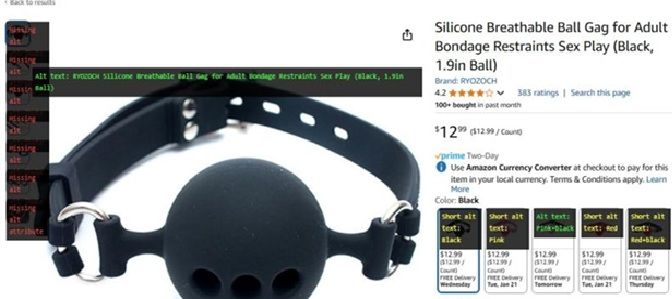
- Install the Image Alt Text Viewer Chrome extension https://chromewebstore.google.com/detail/image-alt-text-viewer/nhmihbneenlkbjjpbimhegikadfleccd?hl=en
- Identify images that lack alt text or have generic descriptions
- Add in the alt text, and re-upload
How Alt Text and Rufus Work Together on Amazon
Alt text on Amazon is not the same as alt text for websites. On Amazon, alt text serves a dual purpose: accessibility for visually impaired shoppers and data for Amazon's AI systems, including Rufus.
Here is how to write alt text that works for both:
- Describe the image AND the product benefit. Instead of "product image 3," write something like "stainless steel water bottle showing double-wall vacuum insulation keeps drinks cold for 24 hours."
- Include your focus keyword naturally. Rufus uses alt text to understand product context. If your keyword is "insulated water bottle," weave it into your description.
- Be specific about dimensions, materials, and features shown. Detailed descriptions give Rufus rich semantic data to work with.
- Write 1-2 sentences, not single words. Short alt text wastes an opportunity. Give Rufus enough context to understand and recommend your product.
The sellers who nail alt text now will have an edge as Rufus becomes a larger part of how shoppers discover products on Amazon. This is SEO for the AI era.
Frequently Asked Questions
What is Amazon Rufus and how does it affect product listings?
Rufus is Amazon's AI shopping assistant that helps customers find and compare products. It uses listing data including alt text, bullet points, A+ Content, and reviews to generate recommendations. Listings with richer, more descriptive content give Rufus more to work with.
How do I add alt text to my Amazon product images?
Go to your listing in Seller Central, click Edit, and navigate to the Images tab. Each image slot has an alt text field. Fill in descriptive, keyword-rich text for every image.
Does alt text really affect Amazon SEO and product discovery?
Yes, increasingly so. As Amazon integrates more AI-driven product recommendations through Rufus, alt text provides semantic context that traditional keyword optimization does not. Think of alt text as metadata that helps Amazon AI understand what your product looks like and does.