
 If you’re planning a trip and not using Google Flights, you’re doing it the hard way.
It’s fast, clean, and shows you real airline prices without spammy pop-ups or shady booking sites (looking at you, KAYAK & Expedia). You can filter by stops, airlines, bags, departure times, and even carbon emissions.
And the best part? Flexibility.
Let’s say you're flying from either Edmonton or Calgary and you’re open to landing in either London or Paris. Google Flights checks all combinations and shows the cheapest flights instantly. No need to run 12 searches or juggle tabs.
Perfect for ecommerce sellers, business travelers, and anyone who values their time and money.
If you’re planning a trip and not using Google Flights, you’re doing it the hard way.
It’s fast, clean, and shows you real airline prices without spammy pop-ups or shady booking sites (looking at you, KAYAK & Expedia). You can filter by stops, airlines, bags, departure times, and even carbon emissions.
And the best part? Flexibility.
Let’s say you're flying from either Edmonton or Calgary and you’re open to landing in either London or Paris. Google Flights checks all combinations and shows the cheapest flights instantly. No need to run 12 searches or juggle tabs.
Perfect for ecommerce sellers, business travelers, and anyone who values their time and money.
Quick Pro Tips:
- Use the date grid to find cheaper days
- Set price alerts for your route
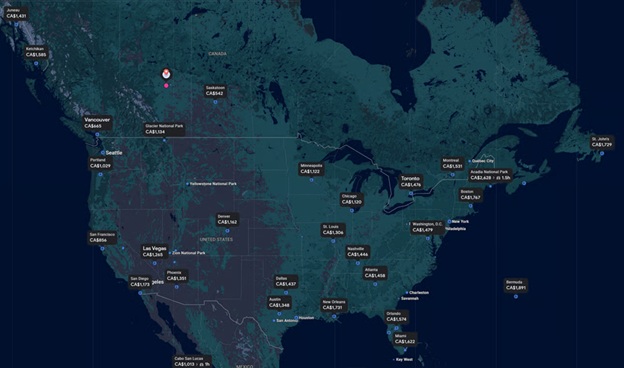
- Try the Explore Map for spontaneous deals
- Always book direct through the airline (Google sends you there)
Google Flights Features That Save Serious Money
Google Flights has features that most travelers never discover. Here are the ones that consistently save me hundreds of dollars per trip:
- Explore mode: Click "Explore" on the main page to see a map of destinations with the cheapest fares from your airport. Perfect when you are flexible on where to go.
- Date grid and price graph: See how prices change across different travel dates. Sometimes shifting your trip by one or two days saves 30-50% on airfare.
- Price tracking: Toggle "Track prices" for any route and Google will email you when fares drop.
- Multi-city routing: Build complex itineraries with different departure and arrival cities.
- Filter by alliance or specific airline: If you are collecting points on a specific airline, filter results to only show those carriers.
- "Cheapest" sort: The default sort is "Best" which balances price and convenience. Switch to "Cheapest" to see absolute lowest fares.
One underrated trick: search for flights from multiple nearby airports. If you live near two airports, Google Flights lets you compare both simultaneously. The savings can be significant for international flights.
Frequently Asked Questions
Is Google Flights actually cheaper than other booking sites?
Google Flights does not sell tickets. It shows you real-time prices and links directly to the airline or booking site. It saves money through better comparison tools, not lower prices.
How far in advance should I book flights using Google Flights?
For domestic flights, 1-3 months in advance typically offers the best prices. For international flights, 2-6 months ahead is the sweet spot. Use price tracking to monitor your route and book when it hits a low.
Can Google Flights track price drops for specific routes?
Yes. Search for your route and dates, then toggle Track prices. Google will email you when the price drops or is about to increase. You can track multiple routes simultaneously.